Rebecca BirchRebecca is a New Mexico Tech graduate who recently discovered the joys of tutoring and mentoring high school students in mathematics and language arts. While working with her students, Rebecca has learned much about the nuances of touchscreen technology and the role it plays in their communication. Other tactile activities include rock climbing, playing the viola, and enhancing her side work as a photographer.
ContentsDiscussion on HTDs in Regard to Literature and Survey |
IntroductionAs handheld devices and touch-screen interfaces have become more common, we have begun to see the merging of the two technologies. While a great amount of attention has been given to the design of handheld devices, the design of touchscreens, and how touchscreen technologies can be used in the classroom, little research has been conducted specifically on the usability of touchscreen-based handheld devices. My article seeks to understand how the usability of handheld, touchscreen devices (henceforth referred to as HTDs) impact the ability and desire of individuals to communicate via mobile technology. Because of the increasing pervasiveness of HTDs, technical communicators will need to be cognizant of potential user frustration, as such frustration will inherently result in an unwillingness or inability to communicate using the technology available. In this article, I have reviewed existing knowledge concerning information design principles, general design principles in regards to information presented on traditional desktop computers, and the emergence of mobile technology. Building from this base, I have sought to understand user views on what makes an HTD usable or unusable via both literature review and formal survey. Results indicated that users performed simpler tasks such as text messaging and phone calls more often than more complex tasks such as sending e-mail or browsing the Internet and that small screen size and lack of tactile feedback were frustrating. This article begins with an overview of the histories of mobile and touchscreen technologies and provides key definitions. Through the literature review, effective design principles are examined and the application of these design principles to mobile technology are reviewed with a focus on usability. Next, survey data is presented and correlations between literature and survey results are discussed with subsequent suggestions for HTD interface design posited. History of Mobile TechnologyIn 1947, Douglas H. Ring and W. Rae Young laid the groundwork for the development of mobile phones when they proposed using a more efficient method of boosting radio signal via hexagonal cells. For cellular radio systems, an area of land selected to receive radio signals is divided into a grid of shapes; Rae and Young were the first to propose using hexagons (versus squares). Later, Philip Porter suggested placing radio towers at the corners of these hexagons, as opposed to their centers, thereby maximizing the area that would receive radio signal. Five years later Martin Cooper, then working for Motorola, built upon the earlier idea of the car phone to develop the cell phone, which was first released on the market in 1984 (Nash). History of Touchscreen TechnologyThe foundation of touch technology was laid in 1971 when Dr. Samuel Hurst developed the first touch sensor, which led him to develop the first 5-wire resistive touchscreen in 1977. Currently there exist two popular types of touchscreens: capacitive and resistive. Capacitive touchscreens employ a layer of electroconductive material on the screen which provides a continuous current. Any change in current on the screen, as can be caused by a finger, allows one to interact with and operate the device. An example of a capacitive touchscreen device is the iPad, which users operate via light taps and swipes of one or more fingers. 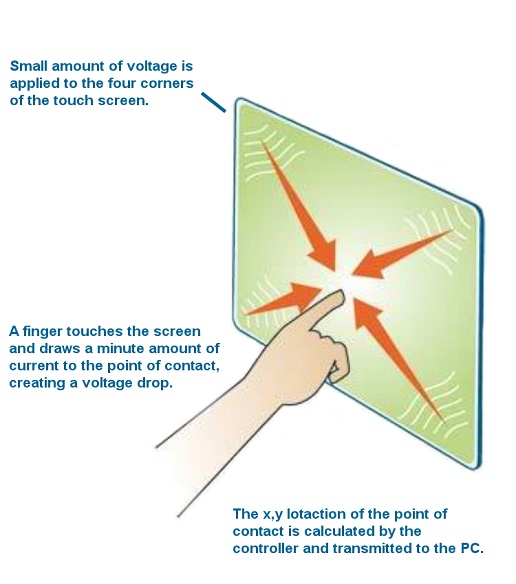 Figure 1: How a capacitive touchscreen works from Bizz n Tech; “Different Types of Touch Screens in Mobile Phones”; 2009; Web; 27 Apr. 2011. Ed. Birch, 7 May 2011. Resistive touchscreens respond to pressure such as from a finger or stylus; the part of the screen being pressed will contact circuits underneath the screen in turn tracking the location of the finger or stylus (Williams). Resistive touchscreen technology is employed in the Nintendo 3DS handheld game system, which one operates by tapping or pressing the bottom screen with their finger or stylus. 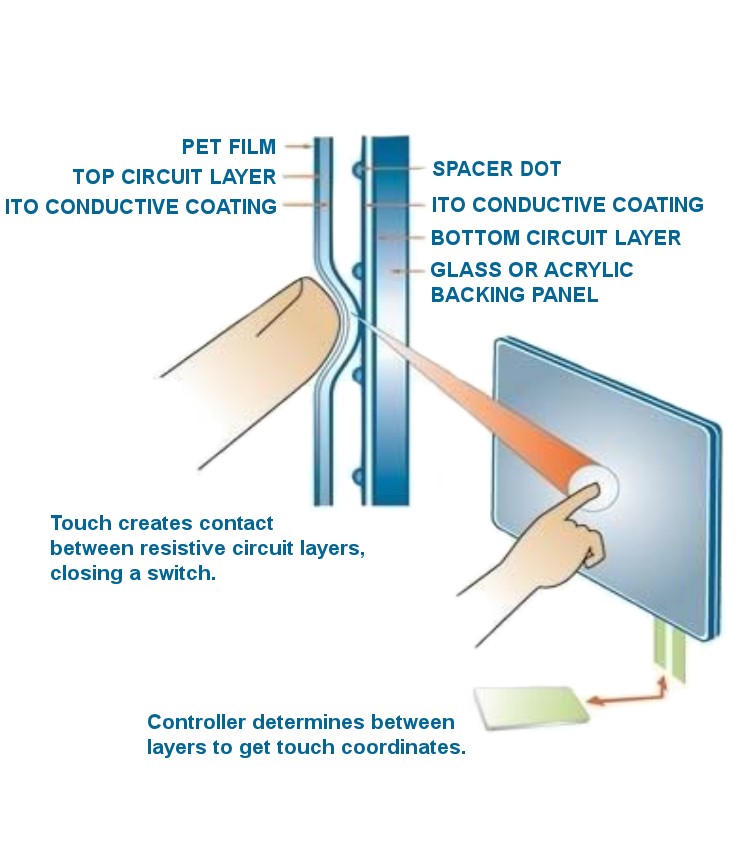 Figure 2. How a resistive touchscreen works from Bizz n Tech; “Different Types of Touch Screens in Mobile Phones”; 2009; Web; 27 Apr. 2011. Ed. Birch, 7 May 2011.
It is important to note that since resistive touchscreens require pressure either a finger or stylus may be used to detect input. This is not the case for capacitive screens, however; since a change in electrical current on the screen is required to interact with the device the use of a finger is required. Such differences in how users interface with capacitive and resistive touchscreens will naturally affect how users perceive these and similar devices. For example, users tend to find capacitive screens "lighter" to use than resistive screens. An area of particular interest in touch technology is haptic feedback. Haptic feedback refers to the vibrations felt when contacting a touchscreen which “denote that a touchscreen button has been pressed” (Oryl). This kind of feedback is an important aspect of human-computer interactions, as Brewster et al. discovered (161). A few common mobile devices which utilize touchscreens are PDAs, smartphones, and tablet PCs:
|